 UNVELL
ReoGrid Web 1.3 Released — Multi-Sheet Workbooks and Cross-Sheet Formulas
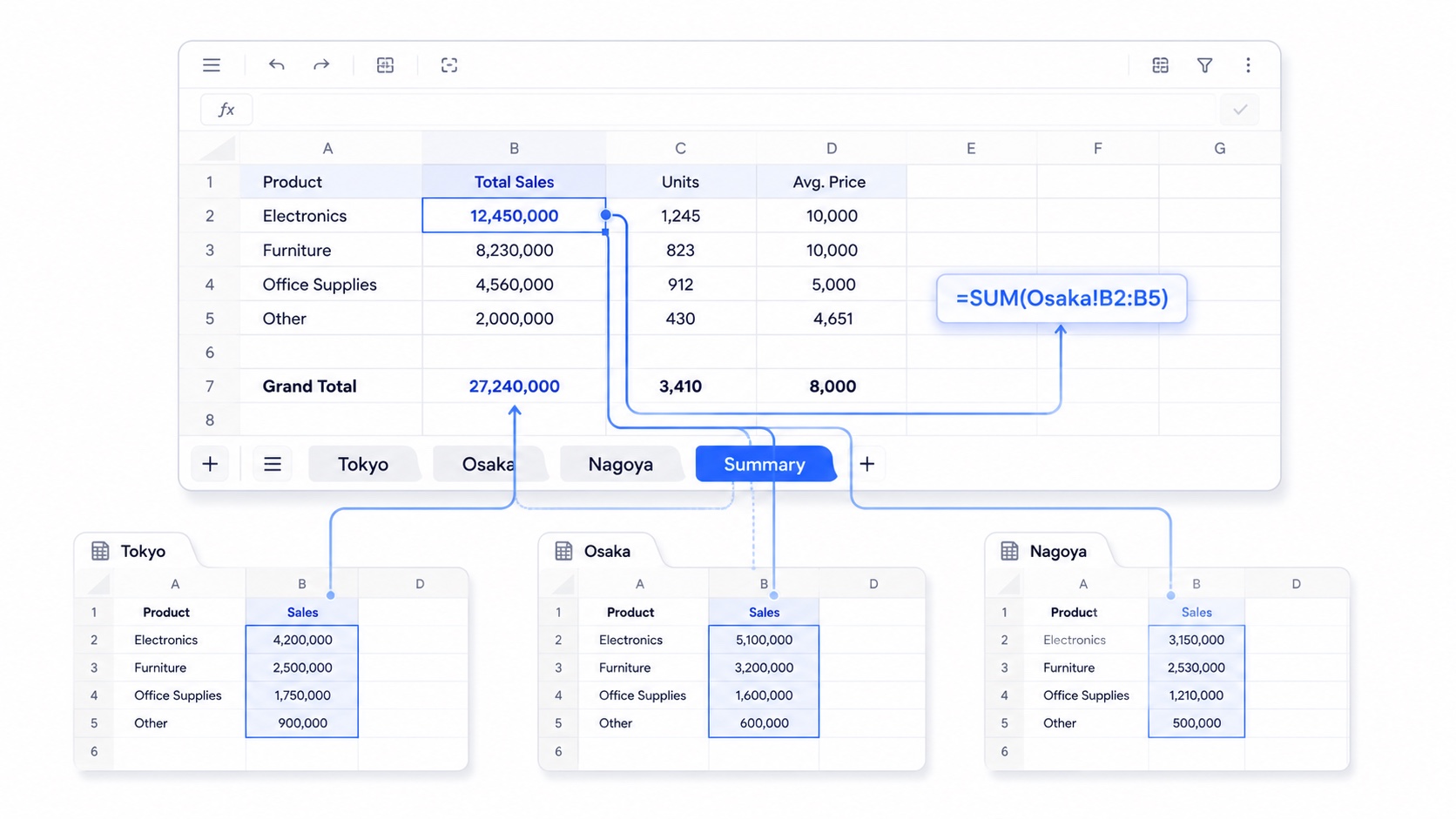
UNVELL Inc. has released ReoGrid Web 1.3, the most structural milestone since the official launch in March: a single grid now becomes a workbook of multiple worksheets. There are no breaking changes to the public API, and multi-sheet support is available on both the Lite and Pro editions.
1.3 highlights
Until now, ReoGrid Web was one instance, one sheet. In 1.3, every instance exposes a workbook coordinator that holds multiple worksheets. Just like Excel, a sheet tab bar appears at the bottom, and each sheet keeps its own data, selection, freezes, and undo history.
And the feature that makes multiple sheets genuinely useful is here too: formulas can now reference cells on other sheets (=Sheet1!A1).
The grid is now a workbook
Every instance exposes a workbook coordinator. The first sheet is created automatically, and adding more is a one-liner.
import { createReogrid } from '@reogrid/lite';

const grid = createReogrid({ workspace: '#app', initialSheetName: 'Sales' });

const expenses = grid.workbook.addSheet('Expenses').worksheet;
const summary  = grid.workbook.addSheet('Summary').worksheet;

grid.worksheet.cell('A1').setValue('Q1'); // grid.worksheet is always the active sheet
The tab bar at the bottom supports add, rename, drag-reorder, show/hide, and tab color. The same operations are available programmatically.
const wb = grid.workbook;
wb.renameSheet(0, 'FY26 Sales');
wb.moveSheet(2, 0);
wb.setSheetTabColor(0, '#2563eb');
wb.setActiveSheet(1);
Each sheet keeps its own undo history, so Cmd/Ctrl+Z never crosses sheets. Because grid.worksheet and grid.actionManager are now getters that follow the active sheet, your existing single-sheet code keeps working unchanged.
One visual change for single-sheet embeds: a ~28px sheet tab bar is shown by default. To hide it, pass
createReogrid({ showSheetTabs: false }).
Cross-sheet formula references
This is what turns a workbook into more than a pile of grids: a formula on one sheet can read cells on another.
summary.cell('B2').value = "='Tokyo'!E6";        // a single cell on another sheet
summary.cell('B3').value = '=SUM(Osaka!B2:B5)';  // aggregate a cross-sheet range
summary.cell('B4').value = '=VLOOKUP(A4, Master!A1:C100, 3)';
summary.cell('B5').value = '=シート1!A1';        // non-ASCII names need no quotes
References resolve case-insensitively, and their lifecycle is Excel-compatible.
- Rename a sheet, and references across all sheets are rewritten.
- Delete a sheet, and references to it become
#REF!. - Insert/delete rows or columns on one sheet, and references from other sheets shift.
- Cross-sheet circular references are detected and reported as
#CYCLE!.
Because the aggregate functions and the full LOOKUP family work over cross-sheet ranges, you can build a summary sheet entirely from =SUM(Region!...) rows and have it update live every time you edit a source sheet.
Whole-workbook I/O
The instance I/O methods now operate over all sheets at once.
// Export the entire workbook to a single .xlsx
grid.saveAsXlsx({ filename: 'report.xlsx' });

// Load all sheets from a File / URL / ArrayBuffer
await grid.loadFromFile(file);
await grid.loadFromUrl('/data/book.xlsx');

// JSON-serialize the entire workbook
const doc = grid.toJson();
grid.loadJson(doc);
The workbook's view state round-trips through xlsx: the active sheet (<workbookView activeTab>), per-sheet hidden state (<sheet state="hidden">), and tab colors (<sheetPr><tabColor>) are written on export and restored on load. Multi-sheet xlsx import is also faster, parsing the file once and reusing it across all sheets (previously each sheet was re-parsed).
Subscribe once, follow the active sheet
Previously, reacting to selection or value changes meant rewiring listeners every time the active sheet changed. In 1.3 we added instance-level events that forward the active sheet's events and rewire automatically when you switch sheets.
grid.onSelectionChange((range) => updateInspector(range));
grid.onCellValueChange(({ row, column, value }) => autosave(row, column, value));
Available on the instance: onSelectionChange, onCellValueChange, onBulkCellsChange, onScrollChange, onViewportSizeChange, onStructureChange, onContextMenu.
The React/Vue wrappers expose the workbook through the instance and add sheet events.
// React
<Reogrid
  onReady={(grid) => grid.workbook.addSheet('Data')}
  onActiveSheetChange={(index) => console.log('active', index)}
  onSheetsChange={() => console.log('sheets changed')}
/>
The Vue wrapper emits active-sheet-change and sheets-change in addition to the existing events.
Get started
The fastest way to feel it is the multi-sheet workbook demo: three branch sheets (Tokyo, Osaka, Nagoya) and a Summary sheet built entirely from cross-sheet formulas. Edit any branch figure, return to Summary, and the totals recalculate across sheets.
Lite needs no license key — install it straight from npm.
npm install @reogrid/lite
Pro adds the 109-function formula library, xlsx export, the full set of cell types, and license-domain authentication.