 UNVELL
ReoGrid Web 1.5 Released — Find & Replace, Drag-to-Move, Headers/Footers, and PDF by Locale
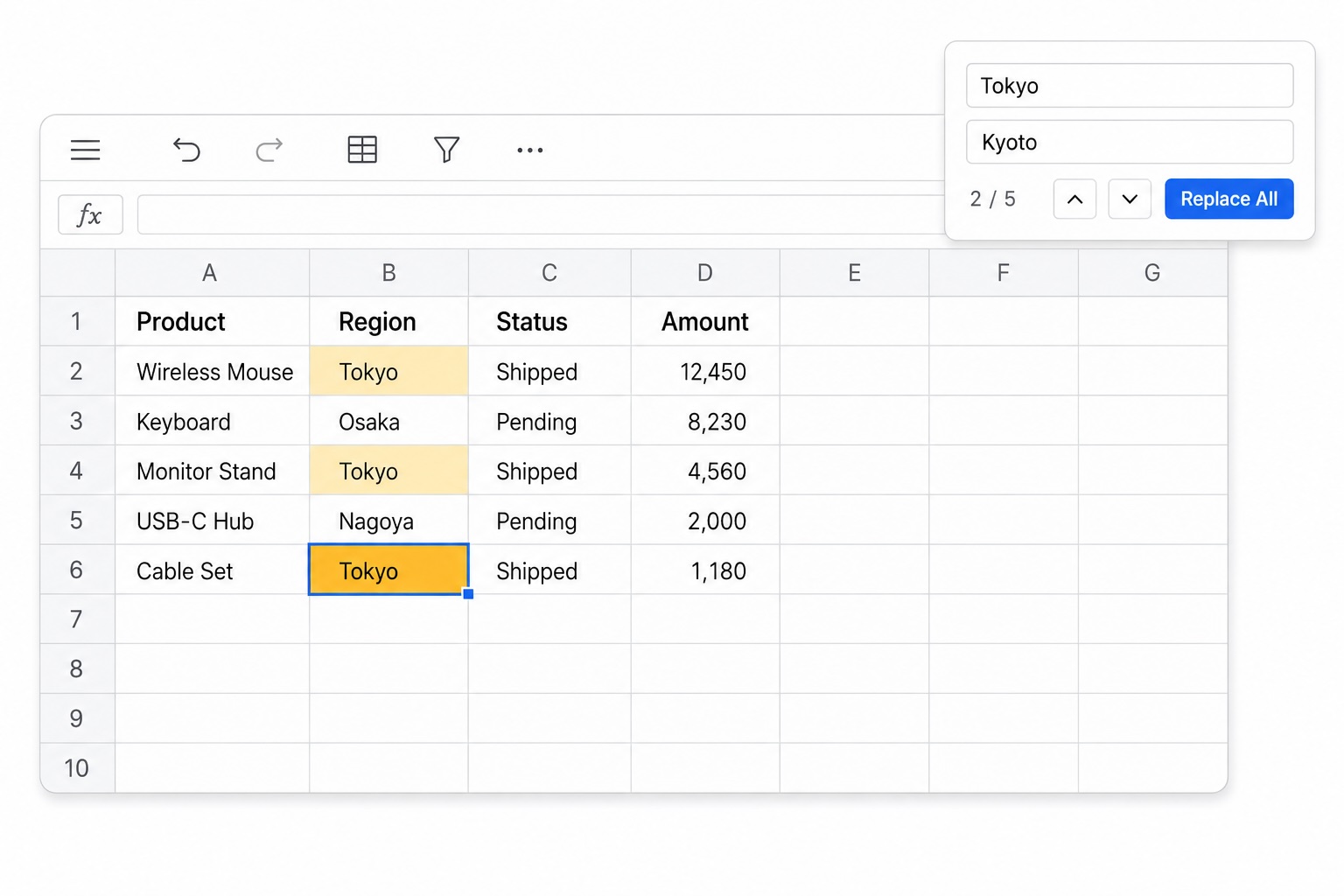
UNVELL Inc. has released ReoGrid Web 1.5, a feature release that fills in the places where "Excel does this, and we did not yet." Four headline items: find & replace, drag-to-move for ranges, rows and columns, page headers and footers, and PDF export by locale. There are no breaking changes to the public API.
1.5 highlights
| Feature | Edition |
|---|---|
| Find & replace (Ctrl/Cmd+F, Ctrl/Cmd+H) | Lite / Pro |
| Range, row and column drag-to-move | Lite / Pro |
| Page headers and footers | Pro |
| PDF export by locale (CJK fonts) | Pro |
Find & replace and drag-to-move are treated as basic editing, so they are available in the free Lite edition as well.
Find & replace — Ctrl/Cmd+F and Ctrl/Cmd+H
Press Ctrl/Cmd+F (find) or Ctrl/Cmd+H (replace) over the grid and the built-in find bar opens. Every match is highlighted on the canvas, and Enter / Shift+Enter step through them.
Searches run over one of three scopes — the sheet, the selection, or the whole workbook. Workbook scope activates the sheet a match lands on and reports your position as 2/4 · Sheet1.
The options follow Excel: match case, entire cell contents, and regular expressions.
Everything the bar does is also available programmatically.
import { createReogrid } from '@reogrid/lite';

const grid = createReogrid({ workspace: '#app' });

// Open the bar (same as Ctrl/Cmd+H)
grid.showFindBar('replace');

// Or search without the UI
grid.find('Tokyo', { scope: 'workbook', matchCase: true });
grid.findNext();

// Returns the number of cells rewritten
const count = grid.replaceAll('Tokyo', 'Kyoto', { wholeCell: true });
By default a search compares against each cell's raw input — =SUM(A1:A3) for a formula cell. Pass lookIn: 'value' to search the displayed text instead; in that mode a formula cell whose result matched is never rewritten.
A replace-all is undoable in a single step and skips protected cells.
To build your own search UI, disable the built-in bar and drive the API directly.
const grid = createReogrid({ workspace: '#app', showFindBar: false });
Drag to move ranges, rows and columns
Grab the border of a selection and drag it to relocate the cell block. Values, formulas, rich text, number formats, styles, cell types, borders, comments and lock states all travel together, and the destination is overwritten — exactly as in Excel.
Dragging an already-selected row or column header does something different: it reorders whole rows or columns as a cut-and-insert. That is a pure permutation, so nothing is lost.
// Move B2:D10 so that its top-left lands on F2
grid.worksheet.range('B2:D10').moveTo(1, 5);
A move that would tear a merged cell, land outside the sheet, hit a protected cell, or run while a delay-load data source is attached is refused.
Moves emit a cancellable event, so a host can substitute its own behaviour.
grid.onBeforeRangeMove((e) => {
  // Never let the header row be moved
  if (e.kind === 'rows' && e.from.topRow === 0) {
    e.cancel = true;
  }
});

grid.onAfterRangeMove((e) => {
  console.log(e.kind, e.from, e.to); // completed moves only
});
If your application does not want the interaction at all, turn it off without touching the API.
grid.worksheet.setRangeMoveEnabled(false);
Page headers and footers (Pro)
Print and PDF output can now put page numbers, dates and sheet names in the paper margins. A band has left, center and right sections for both header and footer, and the text holds Excel's format codes verbatim.
grid.worksheet.setPrintSettings({
  headerFooter: {
    header: { center: 'Sales Report', right: '&D' },
    footer: { right: 'Page &P / &N' },
  },
});
&P (page), &N (page count), &D / &T (date and time), &F (file name) and &A (sheet name) are supported, including offsets like &P+2. Because the codes are stored rather than expanded, a round-trip through xlsx keeps them intact in Excel. differentOddEven and differentFirst are available for alternating and title pages.
When a band is taller than its margin allows, the body area is pushed in rather than drawn over — Excel's behaviour, which means a tall header costs you rows per page. The break computation, the PDF exporter and the paged print HTML all share that geometry, so what you see and what you print agree.
PDF export by locale (Pro)
PDF embeds glyph outlines, so exporting needs real font bytes. Through 1.4 the only bundled loader was a Japanese font, which covers roughly a third of everyday simplified-Chinese business vocabulary — Chinese sheets came out full of tofu (□) with no supported way to fix it.
1.5 introduces a font registry with ja, zh-CN, zh-TW and ko registered out of the box. Name a locale and the right font is embedded.
import { preloadPdfFont } from '@reogrid/pro';

// Once at app start — this is where the download happens
await preloadPdfFont('zh-CN');

// Thereafter, export synchronously from anywhere
grid.saveAsPdf({ locale: 'zh-CN', filename: 'report.pdf' });
Registration and loading are separate steps in order to keep PDF export synchronous. saveAsPdf ends in a click on a download anchor, and an await immediately before that would lose the user-gesture context and meet the popup blocker. Network access is therefore moved to an async point the caller controls.
We have also published subsetted CJK fonts as npm packages. The built-in sources point at full upstream fonts on a public CDN, which can be slow or unreachable in some environments — notably mainland China. Installing a package removes the runtime network entirely and works on the offline intranets common in enterprise deployments.
npm install @reogrid/font-sc
import { registerPdfFont, preloadPdfFont } from '@reogrid/pro';
import { loadNotoSansSC } from '@reogrid/font-sc';

registerPdfFont('zh-CN', loadNotoSansSC);
await preloadPdfFont('zh-CN');
Alongside @reogrid/font-sc (zh-CN / GB 2312) there are @reogrid/font-tc (zh-TW / Big5), @reogrid/font-jp (ja / JIS X 0208) and @reogrid/font-kr (ko / KS X 1001).
Also added and improved
instance.focus()— returns keyboard focus to the grid. Call it after a host toolbar action so the next shortcut (undo, copy/paste, arrow navigation) reaches the grid instead of the browser.- Clearing outlines in one call —
clearRowOutlines()/clearColumnOutlines()drop every group and reveal any rows or columns a collapsed group was hiding. This is what you want when rebuilding an outline tree from a model. - Bounded auto-fit scanning —
autoFitMaxScanRows(default 1000) caps how many rows are measured when auto-fitting a column, bounding the cost on very large sheets. - Double-click fits the whole selection — select A:D and double-click any of their borders and every selected column is fitted, as in Excel.
- HiDPI re-scale on monitor change — the grid watches
devicePixelRatio, so moving a window between a Retina and a standard display no longer leaves the canvas blurry.
Notable fixes
- Text overflowing from a cell no longer disappears when the cell holding it scrolls out of view.
- Dropdowns (list validation rules and the auto-filter popup) near the bottom of the window now open upward instead of off-screen.
- On hosts with classic, space-reserving scrollbars (Windows and similar), the last row and column are no longer hidden beneath the scrollbar.
- Freezing panes no longer leaves dead travel at the end of the scrollbar.
readReoGridJson()now resets the worksheet before loading, so opening a second document no longer leaves the previous one underneath it.- PDF export honors B4, B5, Tabloid and Executive in
pageSize— previously anything outside a five-entry table silently fell back to A4, which made JIS B4/B5 a quiet wrong-output bug in Japan. - PDF export follows the sheet's own grid-line setting (
setShowGridLines(false)). - A border sitting on a page boundary now prints on both pages.
- A number-formatted formula cell no longer keeps a stale value after a bulk recalculation such as a sort.
See the CHANGELOG for the full list.
Get started
Lite needs no license key — install it straight from npm. Find & replace and drag-to-move both work there.
npm install @reogrid/lite
Pro adds the 109-function formula library, xlsx and PDF export, page headers and footers, and the full set of cell types. A 30-day evaluation is available.