 UNVELL
A High-Performance Spreadsheet Component That Runs on Mac and Linux — ReoGrid V5 for Avalonia
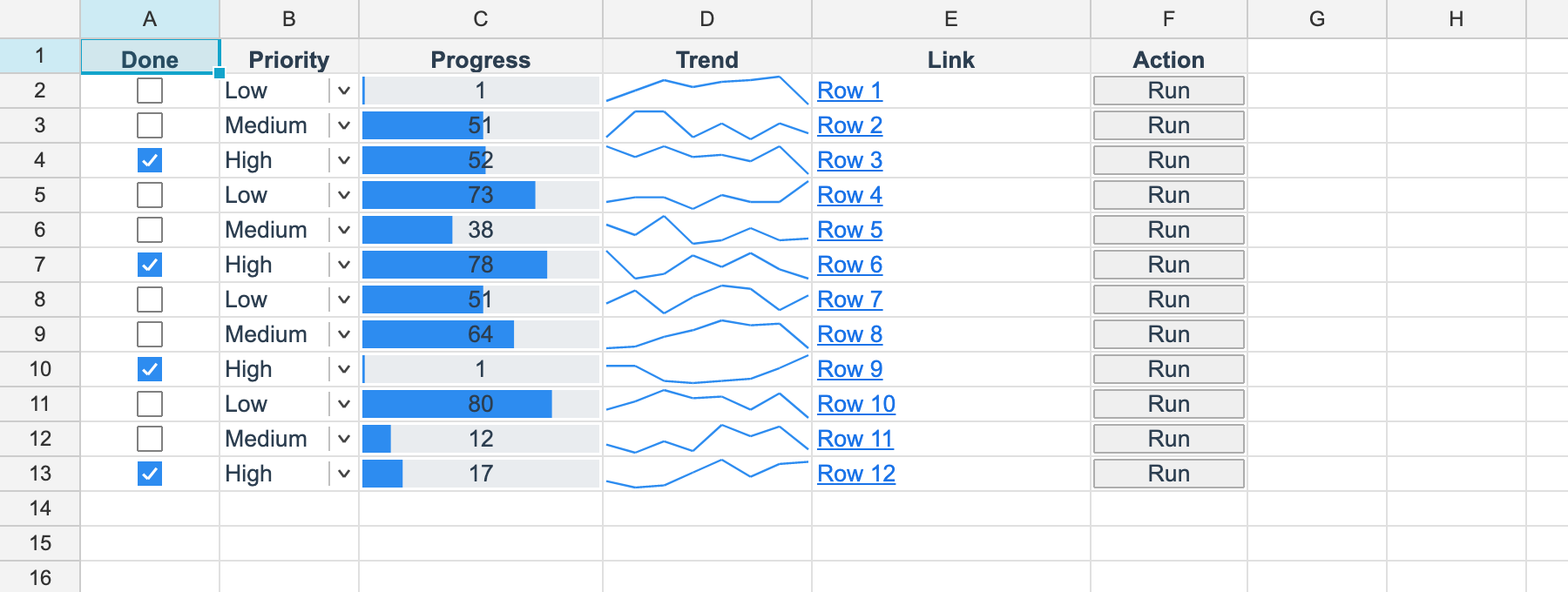
UNVELL Inc. has released ReoGrid V5 for Avalonia, bringing its .NET spreadsheet component to Windows, macOS and Linux.
The same code, the same .NET project, running on all three desktops.
Look at the image at the top of this article. Checkboxes, dropdowns, progress bars, sparklines, links, buttons — that grid of Excel-style cell types is ReoGrid drawing on macOS. It was not captured on Windows and reused: it came out of dotnet run on an Apple Silicon Mac.
The Avalonia build is made by using the ReoGrid V5 core engine as it stands, so everything that makes V5 good carries over unchanged. For the V5 release itself, see ReoGrid V5 Released — Full Virtualization on Line One, Making a Million Rows Ordinary.
The field has already moved beyond Windows
The environment around line-of-business applications has shifted quietly over the past few years.
- Developers work on Macs now. Even on teams building business systems, a MacBook as the development machine has become ordinary.
- Linux has arrived on the business desktop. Public-sector and education migrations away from Windows, embedded terminals on production lines and in medical devices, large sites optimising cost.
- The server side assumes Linux. Generating a report as PDF is work you want to finish inside a container.
Meanwhile, the work that needs "an Excel-like screen" continues exactly as before. A spreadsheet UI is a requirement well beyond the Windows desktop now.
ReoGrid V5 for Avalonia answers that shift directly.
Cross-platform, and seriously fast
As noted above, the Avalonia build runs on the same core as V5, so full virtualization — the heart of V5 — applies here in full. The speed lives in the engine, and that engine is shared by all three operating systems.
- A frame costs the same ~6.5 ms at a hundred thousand rows and at a million. What sets the workload is the range you can see, not the volume of data behind it, and it fits inside the 16.7 ms a frame gets at 60fps.
- Reading one screen of cells takes 30.4 µs, and the read path itself allocates zero bytes. Against the previous generation's 95.4 µs and 90.8 bytes, that is 3.1× on time and 78.8× on allocation. Fling the scrollbar to the far end and the grid tracks your finger the whole way.
- Ten million cells held at 16.4 bytes each — 156 MB. The previous generation needs 298.2 bytes per cell and 2.78 GB, a 18.2× difference. It settles comfortably inside a laptop's memory.
Memory and read figures measured on AMD Ryzen 9 9900X / Windows 11 / .NET 10.0.10 / Workstation GC, median of 3 runs; frame paint on Apple M4 Pro / macOS / Avalonia + Skia, median of 200 renders (both August 25, 2026). The three operating systems run the identical engine, so the same design characteristics carry over to Mac and Linux. The full set of measurements and conditions is in the V5 release article.
There is no "the cross-platform build is a little slower" caveat here.
IME text entry works on Mac and Linux
For Japanese line-of-business applications, this is a hard requirement.
The Avalonia cell editor implements Avalonia's input-method contract. Start typing Japanese into a cell and the candidate window follows the caret, on macOS's input methods and on Fcitx/IBus under Linux alike.
The grid does its part too: begin CJK input over a cell that is merely selected, and the editor opens on the spot. Excel's own "select a cell and just start typing" feel is identical across the three operating systems.
Shortcuts follow local convention as well — copy, cut and paste use Ctrl on Windows and Linux, and Cmd on macOS.
One DLL, one licence
Adoption looks the same as it does on the other platforms.
dotnet add package unvell.ReoGrid.One.Avalonia
| Item | Detail |
|---|---|
| Package | unvell.ReoGrid.One.Avalonia 5.0.0 |
| Target | net10.0 (Windows / macOS / Linux) |
| Avalonia | 11.3.17 |
| Contents | Core engine, formula engine, XLSX/PDF I/O and the Avalonia control in a single self-contained DLL |
| NuGet dependencies | Avalonia alone |
That one reference exists because a control must bind against the same Avalonia its consumer uses. Everything else is dependency-free: XLSX and PDF are read and written without any external library.
One licence covers WinForms, WPF, Avalonia and headless use. Adding a platform leaves your licence count at one, and a key issued for V4 activates the Avalonia build unchanged.
PDF output stays Japanese-ready on Mac and Linux
PDF export runs dependency-free on Avalonia too. A Japanese font is bundled and embedded, so macOS and Linux produce the same Japanese PDF whatever is installed on the machine, with the text still searchable and copyable afterwards.
Paper sizes, margins, scaling, fit-to-page, repeated print titles and Excel's &P &D header/footer codes all come from the same pagination engine the Windows builds use. A report layout designed on Windows reproduces exactly inside a Linux container.
What is available today
The Avalonia build already covers:
Cell editing with IME, selection and keyboard navigation; row and column insert, delete, resize and auto-fit; cell formatting (font, colour, alignment, borders, number formats, merging, text rotation and indentation); the full conditional-formatting set including icon sets; six cell types (checkbox, dropdown, progress bar, button, link, sparkline); the formula engine (around 85 functions, cross-sheet references, defined names); undo/redo; the clipboard (TSV and HTML, interoperable with Excel); auto-fill; data validation; sheet protection; find and replace; frozen panes; outlining; banded rows; zoom from 10% to 400% on Ctrl+wheel; worksheet images; and XLSX, PDF, JSON and CSV I/O.
A few things lead on WinForms and WPF for now.
- The auto-filter dropdown UI, the sort and custom-filter dialogs, and the find/replace dialog. The functionality itself is available as API on all three controls, callable from your host application. The built-in dialog UI rolls out to Avalonia progressively.
- Direct printer output, which the Windows builds provide. On macOS and Linux, route through PDF export.
We are happy to confirm the exact status of whatever your project needs — please get in touch.
Ten years of production use, now on three operating systems
Since its debut in 2014, ReoGrid has been adopted in projects across more than twelve countries, including Japan, the United States and Germany, with over 180,000 downloads through NuGet. It is in production in domains where reliability is paramount, financial systems among them.
All ten years of that work — Excel-compatible formulas and formatting, a design built for large data, careful handling of Japanese environments — crosses over to Mac and Linux intact. On a new platform, you keep the component you already know.
ReoGrid is a registered trademark in Japan (Registration No. 7052809).
Try it on your own Mac
The evaluation build runs as it is. On Mac or on Linux, one dotnet add package line starts you off.
For the design behind V5's core, see ReoGrid V5 Released — Full Virtualization on Line One, Making a Million Rows Ordinary.